

|
|
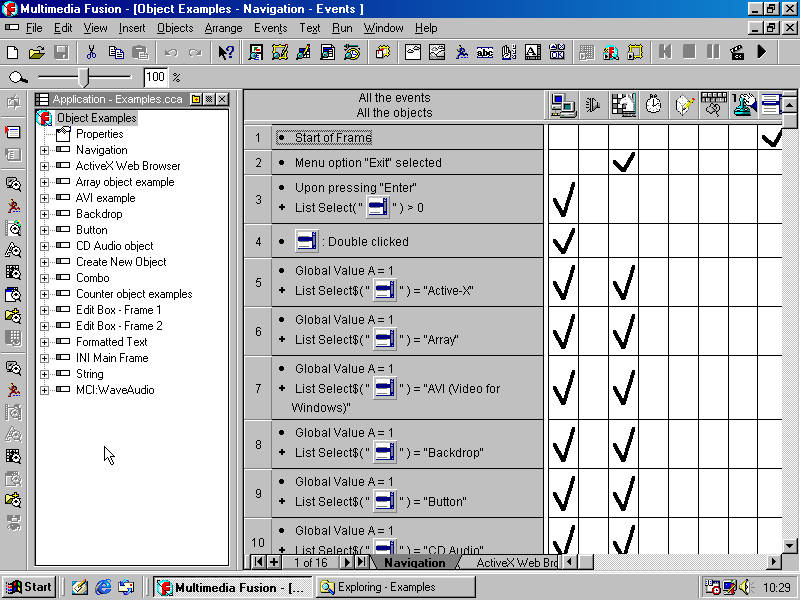
| Version 1.5 running on Windows 98. | |
| Developer | |
|---|---|
| Status | Obsolete |
| Initial Release | v1.0 Build 87 06/1998 |
| Latest Release | v1.5 Build 119 03/2005 |
| Platforms |


|
| Languages |
 English English Français Français |
| Links | |
| Predecessor | |
| Successor | |
Multimedia Fusion, or as commonly referred to as MMF or MMF1.x (depending on the version at the time) is the successor product to Click and Create and The Games Factory developed by Clickteam. The software had a long run of 8 years, before it was succeeded by Multimedia Fusion 2.
It was going to be called Corel Click & Create 2, however the software’s licensing was given to IMSI, which would then cause the program to be renamed to IMSI Multimedia Fusion. IMSI Multimedia Fusion was a commercial flop, selling very poorly. This resulted in IMSI eventually selling the rights of Multimedia Fusion to its developers, Clickteam.
Clickteam would then launch an online shop where it would sell Multimedia Fusion without the need for third party distributors. Although Click & Create, also known as Multimedia Fusion Express, was already officially discontinued by Clickteam, Multimedia Fusion was sold alongside The Games Factory, with The Games Factory still being marketed as the budget option because the price of Multimedia Fusion was steeper.
Contents

Program Icon
Editions
Standard
Not yet documented.
Pro
Not yet documented.
Versions
Version 1.0
IMSI Multimedia Fusion 1.0 is the first version of IMSI Multimedia Fusion, which was released in 1998 and distributed by IMSI. It had an IMSI Registration Wizard, which was not in version 1.2. It has the most commonly known objects, including Array, Button, Window Control, List, INI, and so on. The stock release of MMF1.0 on the disc is build 87. MMF builds 92 and 93 are described in the MMF1.2 changelog as being Multimedia Fusion 1.1.
Differences from MMF1.5:
- You can’t right click in Frame Editor, though you can right click on objects in it.
- To add new objects to the frame, you have to use the “Insert” top menu, which by default brings you to an “Insert new object” wizard, which can be disabled. It only lets you access the most common objects like Active, Backdrop and video player objects or import object from libraries or other applications; to be able to add other objects, including extensions, you have to disable the wizard.
- There’s also a “New Frame” wizard which is also pretty limited but you can also disable it.
- 1.0 is a bit more upfront about Apple QuickTime support and creates a shortcut to install QuickTime.
- There is a “Garbage can” where you can put deleted objects.
- Projects can be built for 16-bit Windows.
Version 1.2
Multimedia Fusion 1.2 was released by Clickteam in June 2000 when they started distributing MMF themselves. It has most of the same features as MMF1.0 and appears to not have all too many differences, aside from minor ones such as bug fixes. It was mostly distributed as an update patch for MMF1.0, and build 98 of MMF1.2 was also included on MMF1.5 discs for the purpose of building 16-bit Windows applications because MMF1.5 removed support for building 16-bit Windows applications. The update wizard for MMF1.0 to MMF1.2 makes note that MMF1.2 is not supported by IMSI and that any questions should be sent to Clickteam. The earliest version of MMF1.2 is build 94, and the latest version of MMF1.2 is build 98.
Version 1.5
Not yet documented.
Guides
MMF on Windows 11/10
On Windows 10, Windows 11 and possibly other post-Windows XP versions, when running Multimedia Fusion 1.5, 1.2 or 1.0, the application hangs at the splash screen. This is caused by 2 problematic files in the extensions folder:
kcqtvr.cox
kcqtw.cox
When these files are removed from the extension folder in MMF 1.5 or 1.2, they launch fine on Windows 11 and should work the same on Windows 10. This will allow Multimedia Fusion 1.5 or 1.2 to run, however, occasionally when you try to rename something, you might notice a problem:
Updating MMF 1.5 to the latest version on Windows Vista or newer
If you are updating Multimedia Fusion 1.5 to the latest version (119) on Windows Vista or newer, you will need to run the updater as Administrator even if it does not initially prompt you for this. This is because in some update in between the stock release on the disc (105) and the latest version (119), a license check was added to the startup which checks the Windows Registry for your serial number. Because the stock installer on the disc does not prompt the user for the serial number, the updater has to prompt the user for the MMF 1.5 serial number to add it to the Windows Registry, and so the updater requires administrator privileges. If the updater is run without administrator privileges, it will fail to add the serial number to the Registry, and so MMF 1.5 will fail to launch.
Garbage characters

See all that gibberish after the text “test”? those are garbage characters, and that is a problem due to a bug in the MMFUSION.exe application. It can be fixed if you download the following extension and drop it in your extensions folder:
MMFCompat.cox (MMF 1.x compatibility fix) is an unofficial bug-fix extension for Multimedia Fusion 1.x that was created by Joshtek, revised by TropicalBananas, and published by the EncycloFusion project. This extension is somewhat different from other MMF extensions because it only serves to fix a bug in the MMF editor that does not affect the runtime executable. You do not need to put the extension in the Data\Runtime folder and you do not need to insert it as an object into your CCA, just having it in your MMF Extensions folder is sufficient to fix the bug.
MMF on Windows 7/Vista
The following extension is incompatible with Aero:
kcqtw3.cox
It hangs the application on Windows Vista and 7, but doesn’t on Windows 11. A solution is to disable Aero or DWM, setting the theme to Aero Basic.